
Supplier details are synced to AIM at regular intervals (usually each night) from your property management/strata management system. Supplier details can't be amended in AIM. If you need to change supplier details, this is done in your property management /strata management system and the updated information will show after the next sync.
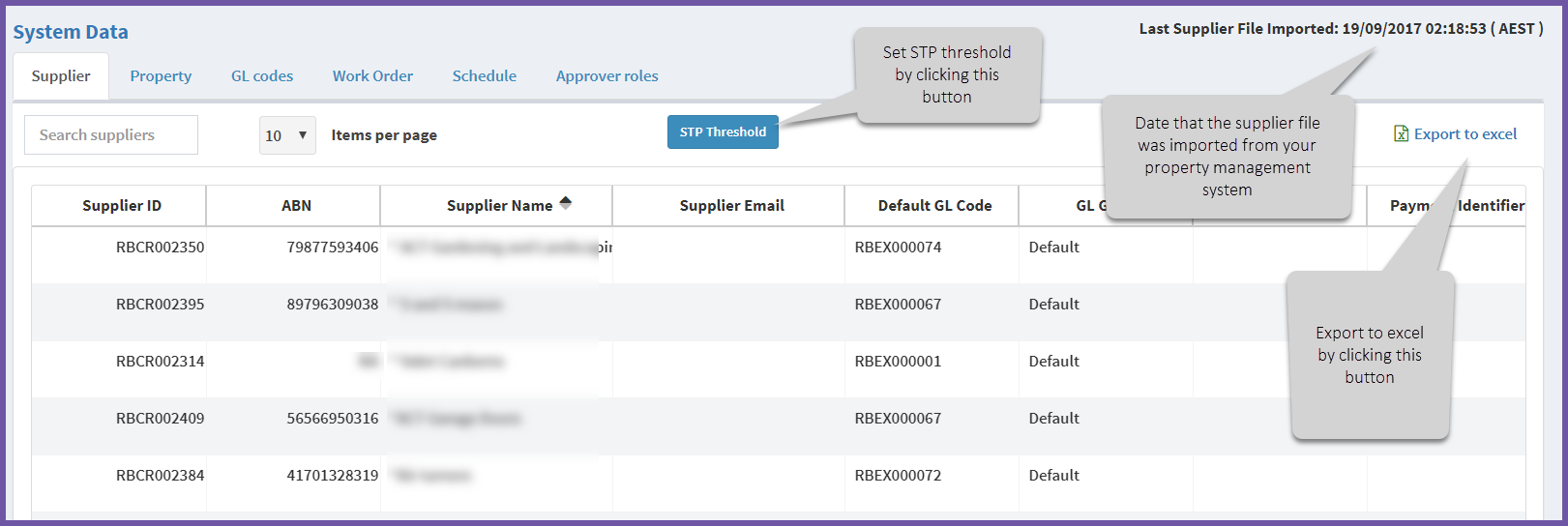
The supplier details show key data about each supplier including:
Supplier ID – a code set by your property management/strata management system
ABN – the Australian Business Number of the supplier.
Supplier Name – the name used in your property management/strata management system.
Supplier Email – if your property management/strata management system has a generic email for the supplier it shows here.
Default GL code – suppliers are often associted with a particular type of work. For example, a lawnmowing contractor might be associated with the GL code "Lawnmowing". An electrician may be associated with an "Electrical Repairs" GL code.) These codes are default and can be overwritten when required for a specific invoice.
GL Group – the GL group the supplier's default GL code belongs to .
Payment method – if the supplier requires a particular payment method and it has been recorded in your property management system it will be displayed here.
Payment identifier – if the supplier payment requires a specific identifier it will be displayed here
STP option – this field will indicate whether a Straight Through Processing (STP) threshold is in place for the supplier.
Related articles:
Why can't I update Supplier, GL Code or Property data in AIM?
Comments
0 comments
Article is closed for comments.